 EN
EN

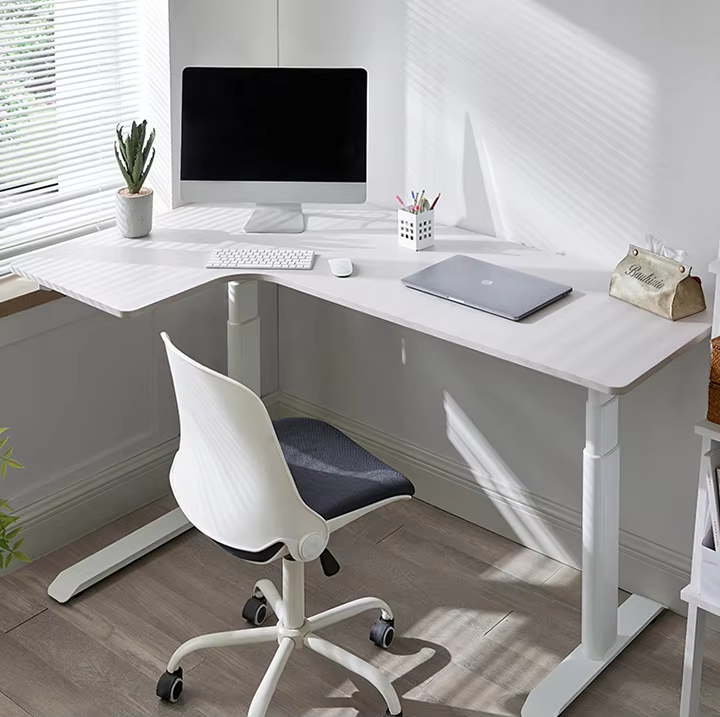
Configuração Ergonômica de Mesa de Estudo para Foco Sustentado
Altura Ideal da Mesa, Alinhamento da Cadeira e Postura para Prevenir a Fadiga
Ao configurar uma estação de trabalho, comece ajustando a mesa de modo que, ao sentar, os cotovelos fiquem na altura da superfície da mesa e os antebraços permaneçam paralelos ao solo durante tarefas de digitação. Combine essa configuração com uma cadeira ajustável de qualidade que ofereça um bom suporte lombar para manter a curvatura natural da coluna vertebral. Os pés devem permanecer firmemente apoiados no piso, ou, alternativamente, apoiados em um suporte adequado, se necessário. Os joelhos devem formar aproximadamente um ângulo reto, os ombros devem permanecer relaxados e o monitor utilizado deve ficar ligeiramente abaixo ou no mesmo nível dos olhos, garantindo conforto visual. Estudos indicam que esses ajustes ergonômicos podem reduzir o desconforto nas costas em cerca de 40% ao longo de períodos prolongados, ajudando a combater a fadiga causada por longas jornadas de trabalho em estações de trabalho. Não se esqueça também das pausas curtas: levantar-se, realizar alguns alongamentos rápidos e readaptar a postura após meia hora contribui para manter os níveis de concentração sem causar estresse desnecessário às partes do corpo.
Posicionamento da Tela e Ângulo de Visualização para Reduzir a Carga Cognitiva e a Fadiga Visual
Posicione a tela principal do computador entre aproximadamente 50 e 76 cm de distância do local onde a pessoa está sentada, certificando-se de que a parte superior da tela esteja mais ou menos no nível dos olhos ou ligeiramente abaixo deles. Essa configuração permite um olhar natural para baixo de cerca de 15 a 20 graus, o que ajuda a evitar sobrecarga no pescoço. Ao trabalhar com dois monitores, posicione o mais utilizado diretamente à frente e incline o outro monitor para fora em aproximadamente 30 graus para cada lado. Para reduzir o incômodo reflexo luminoso, posicione os monitores de modo que não fiquem voltados diretamente para janelas. Algumas pessoas acham útil instalar uma iluminação suave atrás do monitor, criando um melhor equilíbrio entre o brilho da tela e os níveis de luz ambiente. Estudos indicam que esses ajustes podem realmente reduzir a fadiga mental em cerca de 27%, pois nosso cérebro não precisa constantemente readaptar o foco. Para quem se preocupa com o cansaço visual, lembre-se da antiga regra 20-20-20: faça pausas a cada vinte minutos, olhando para um ponto situado a cerca de seis metros de distância por pelo menos vinte segundos. Simples, mas eficaz!
Estratégia de Iluminação para uma Mesa de Estudos de Alto Desempenho
Iluminação em Camadas: Tarefa, Ambiente e Apoio Circadiano para a Aprendizagem
Quer melhorar o desempenho cerebral? Experimente utilizar três tipos diferentes de iluminação. Comece com iluminação ambiente de aproximadamente 200 a 300 lux, utilizando, por exemplo, fitas de LED embutidas em sancas. Isso cria um nível básico agradável de iluminação, sem ofuscamentos intensos que comprometam o ambiente. Nas áreas destinadas efetivamente ao trabalho, a iluminação de tarefa é essencial: trata-se de pontos de luz intensa, entre 500 e 750 lux, exatamente onde ocorrem atividades como leitura ou escrita. Uma boa luminária de mesa ajustável faz maravilhas nesse contexto, desde que não projete sombras incômodas nem reflita na tela do computador. E não se esqueça dos nossos relógios biológicos! A instalação de LEDs brancos ajustáveis (tunable white) ajuda bastante. Esses LEDs conseguem variar a temperatura de cor ao longo do dia — passando de uma luz brilhante e levemente azulada (cerca de 5000 K), ideal para manter o alerta durante o dia, para tons mais quentes (aproximadamente 2700 K) à medida que a noite cai e o corpo se prepara para o relaxamento. Estudos indicam que essa combinação reduz a fadiga visual em quase metade e mantém a mente fresca mesmo durante aquelas maratonas de estudo que a maioria das pessoas teme.
Temperatura de Cor Ideal e Níveis de Lux para Leitura versus Estudo Digital
Obter a iluminação adequada para diferentes meios faz toda a diferença. Ao trabalhar com materiais impressos, recomenda-se um nível de iluminância de aproximadamente 500 a 650 lux, com luz branca fria na faixa de 5000 K a 6500 K. Isso ajuda a destacar melhor o texto e mantém nossos olhos concentrados no que realmente importa. Já o trabalho em telas exige uma abordagem diferente: reduza a intensidade para cerca de 400–500 lux e opte por uma luz branca neutra de 4000 K. Essa configuração combina-se bem com telas de computador, ao mesmo tempo que atenua os tons azuis intensos tão comuns nos displays atuais. A iluminação branca quente, abaixo de 3500 K, também não é ideal para tarefas que exigem alta concentração, pois tende a induzir sonolência, em vez de manter o estado de alerta. Investir em luminárias ajustáveis — capazes de variar tanto a intensidade luminosa quanto a temperatura de cor — permite transições suaves ao longo do dia. A posição dessas luminárias também é fundamental: direcione-as de forma a evitar reflexos incômodos nos monitores. Uma configuração adequada de iluminação reduz significativamente a fadiga mental ao longo do tempo, comparada simplesmente ao uso da iluminação geral instalada no ambiente.
Ambiente Livre de Distrações: Projetando sua Área de Estudo
Crie uma área de estudo que pareça um verdadeiro refúgio para a reflexão, um local onde as distrações simplesmente não têm espaço. Tente posicioná-la longe do burburinho familiar, do ruído da televisão ou do zumbido dos eletrodomésticos. Estudos indicam que pessoas que estudam em ambientes tranquilos lembram-se melhor das informações — cerca de 23% mais — do que aquelas constantemente interrompidas. Se possível, delimite fisicamente esse local com prateleiras ou divisórias, para que o cérebro reconheça tratar-se de uma zona dedicada ao trabalho sério, e não ao lazer. Nos dispositivos eletrônicos, ative as configurações de foco que bloqueiam notificações aleatórias. Pesquisas revelam que nossa atenção tende a despencar logo após visualizarmos um alerta, geralmente dentro de aproximadamente 9 segundos. Procure aproveitar a luz solar natural, sempre que possível. Pessoas que passam tempo em ambientes bem iluminados naturalmente relatam sentir-se menos cansadas no geral — cerca de 17% menos, segundo alguns estudos. Mantenha também tudo organizado. Mesas desordenadas, de fato, dificultam o raciocínio: algumas pesquisas mostram um aumento de 34% na sobrecarga mental quando o ambiente está bagunçado. E aqui vai a dica mais importante: utilize esse espaço exclusivamente para atividades escolares. Quanto mais consistentemente associarmos um local à concentração, mais fácil se torna para o nosso cérebro entrar automaticamente no modo de foco.
Organização Intencional da Mesa de Estudos para Reforçar o Foco
Regra dos 5 Itens: Seleção de Ferramentas Essenciais para a Calma Visual e a Clareza Cognitiva
Limite o que está sobre a mesa a apenas cinco itens essenciais: canetas ou lápis, o livro que estiver sendo usado no momento, um caderno para anotações, uma garrafa de água e, possivelmente, uma pequena luminária, se necessária. Manter as coisas tão simples assim reduz bastante as distrações visuais — cerca de dois terços, na verdade — o que significa que o cérebro não desperdiça tanta energia processando todos esses estímulos visuais adicionais. Estudos neurocientíficos mostram que ambientes desorganizados realmente prejudicam nossa capacidade de manter o foco adequado. Superfícies limpas também ajudam as pessoas a iniciarem suas tarefas muito mais rapidamente. Estudantes que adotaram essa abordagem relataram começar seu trabalho cerca de 40% mais rápido do que o habitual e experimentaram aproximadamente 28% menos interrupções durante as sessões de estudo, segundo algumas pesquisas.
Sistema de Três Zonas para Materiais Físicos: Referência, Ação e Arquivo
Organize sua mesa em três zonas funcionais distintas:
- Zona de Referência (esquerda): Abriga livros-texto, programas curriculares ou materiais de pesquisa consultados intermitentemente
- Zona de Ação (centro): Reservada exclusivamente para cognição ativa — escrita, resolução de problemas ou uso de dispositivos
- Zona de Arquivo (direita): Armazena trabalhos concluídos, livros de referência ou suprimentos não utilizados no momento
Essa lógica espacial reduz o tempo de recuperação de materiais em 65% e cria limites mentais claros entre as etapas do fluxo de trabalho — prevenindo a contaminação cognitiva cruzada. Rotacione os itens entre as zonas à medida que as tarefas evoluem, para manter seu ambiente dinamicamente alinhado com seu processo de pensamento.
Perguntas Frequentes (FAQ)
P1: Qual é a altura ideal da mesa para conforto ergonômico?
R1: A altura ideal da mesa permite que seus cotovelos fiquem ao nível da superfície da mesa, com os antebraços paralelos ao solo durante tarefas de digitação.
P2: Como posso reduzir o reflexo na tela e a fadiga ocular?
R2: Para reduzir o reflexo, posicione os monitores de modo que não fiquem diretamente voltados para janelas. Use a regra 20-20-20 para reduzir a fadiga ocular.
P3: Qual iluminação é ideal para ambientes de estudo?
R3: Utilize iluminação ambiente, de tarefa e ajustável para criar um ambiente de estudo ideal, com níveis de iluminância (lux) controlados.
P4: Como posso manter o foco em um ambiente livre de distrações?
R4: Escolha uma área silenciosa para estudos, use configurações de foco nos dispositivos e mantenha uma mesa organizada e sem objetos desnecessários para preservar o foco.
P5: Qual é a regra dos 5 itens para organização da mesa?
R5: Limite os itens sobre a mesa a cinco essenciais, incluindo materiais de escrita e uma garrafa de água, para minimizar distrações visuais.