 EN
EN

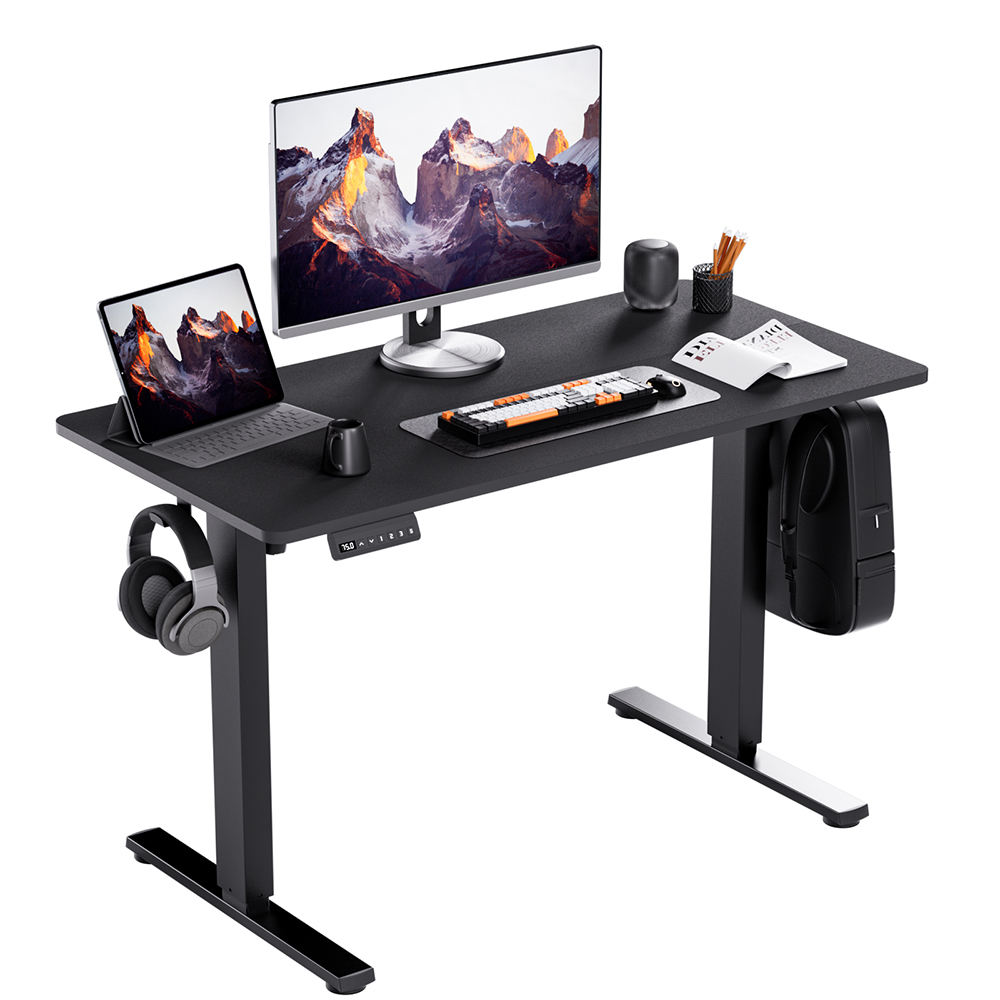
Ergonomic Design: Foundation of Comfort and Long-Term Productivity
Why ergonomic design is crucial when choosing a computer table
When picking out a computer table, good ergonomics matters a lot for our bodies and how productive we can be at work. Studies from CDC back this up showing that around 60% of people who work in offices deal with these issues every year. A properly designed desk actually makes sense for the body's natural position, cuts down on strain over time, and keeps us focused better since everything lines up with how humans move and feel comfortable. Companies have noticed something interesting too – employees working with proper setups tend to get things done faster without getting tired so quickly, sometimes even improving output by about 17%. So spending money on quality ergonomic furniture isn't just about looking modern anymore. It's really about taking care of long term health while making sure everyone stays efficient day after day.
Achieving optimal height and posture alignment for reduced strain
A good computer table helps keep the body aligned properly when working at a desk. Elbows should sit around a right angle while typing, and the monitor needs to reach eye level so people don't have to crane their necks forward all day long. When everything lines up correctly like this, it takes pressure off the back muscles and prevents those nagging shoulder pains many office workers suffer from. Tables with adjustable heights make all the difference since folks can switch between sitting down and standing up throughout the day. Moving positions regularly keeps blood flowing better through the limbs and actually boosts mental alertness too. Most people find they can tackle tasks for hours on end without getting that familiar ache in the lower back that comes from slouching over an ill-fitting workstation.
Case study: Reducing back pain with adjustable ergonomic workstations
Research from the Ergonomics Journal (2023) showed people who used adjustable computer tables experienced about 40 percent less lower back pain after half a year. When workers switch between sitting and standing positions during their day, it actually takes some pressure off the spine while getting different muscles activated. This helps form better posture naturally and makes work time more comfortable overall. The findings point to something pretty obvious really adaptable office setups do wonders for reducing physical discomfort and keeping employees productive throughout the day.
Adjustable Height and Mobility: Enabling Dynamic Work Habits
Benefits of height-adjustable computer tables for sit-stand workflows
Adjustable computer tables make it easier to switch between sitting and standing positions throughout the day, something experts recommend doing roughly every half hour to forty five minutes or so. This kind of movement helps cut down on back pain and general tiredness from staying in one position too long. The newer electric versions adjust up and down pretty quietly without disrupting what someone is working on at their desk. Studies looking at office ergonomics have found that people who use these adjustable desks report feeling better emotionally and actually have around 15 to 20 percent more energy compared to folks stuck sitting all day. For anyone needing to stay productive through long work sessions, this flexibility can really make a difference in keeping concentration levels high when tasks drag on.
Standing vs. sitting: How movement boosts focus and energy
Switching from sitting to standing throughout the day helps get blood flowing better and sends more oxygen to the brain, which makes it easier to focus and think clearly. People who work at adjustable height desks tend to experience about 27 percent fewer back problems than their colleagues stuck at regular desks. Productivity numbers also go up by around 10 to 15 percent for these workers. Beyond just helping with daily concentration, this kind of movement actually cuts down on serious health problems that come from sitting too much over time. Things like heart disease and metabolic disorders become less likely when we break up our sitting habits regularly during the workday.
Casters, trays, and portability features for flexible workspace use
Computer tables with mobility features such as locking casters and built-in cable trays really help them keep up with changing office requirements. The locking wheels stay put when someone is working but roll smoothly when it's time to move things around for group meetings or rearranging the space. When paired with good cable management systems and portable designs, these features become super important in today's offices where one area might be used for different purposes throughout the day. Height adjustment capabilities take things even further, creating workstations that can handle everything from intense individual tasks to collaborative projects all while keeping cables organized and maintaining table stability. Some models even come with extra storage compartments which makes sense considering how many devices people need to connect nowadays.
Spacious Surface and Smart Storage for Efficient Workflows
Maximizing productivity with ample surface area for dual monitors and peripherals
Having enough desk space really matters when it comes to getting work done these days. Studies indicate that people who work with two monitors can finish their tasks around 42% quicker according to the Journal of Organizational Psychology from last year. That makes having decent desk area not just nice to have but actually essential for staying productive. A good workstation should accommodate several screens alongside keyboards, paperwork, and all those little gadgets we need nowadays. The point is creating a workspace that stays tidy while still being practical enough to let someone move around comfortably without constantly hunting for things.
Integrated shelves, drawers, and compartments for clutter-free organization
A good smart storage solution transforms an ordinary desk into something much more productive. When desks come equipped with built-in shelves, drawers, and various compartments, they make it easier to keep everything organized from tangled cables to important documents and office supplies. Research on workspace efficiency suggests that reducing visual clutter helps maintain better focus, with some studies indicating around a 30% improvement in concentration levels. Making the most of vertical space while ensuring all necessary items are easily accessible creates a much cleaner work area. This kind of setup not only looks better but actually makes it easier to stay focused on tasks without constantly searching for misplaced items throughout the day.
Durable Materials and Stability: Building a Long-Lasting Computer Table
How material choice impacts durability in home and office environments
What goes into making a computer table makes all the difference when it comes to how long it lasts and how well it holds up day after day. Better built tables can handle heavier gear, constant moving around, and whatever messes with them from humidity or temperature changes without falling apart. Sure, cheaper alternatives might look attractive at first glance, but going for solid materials means less shaking over time and not having to replace the whole thing every few months because something gave way unexpectedly.
Comparing steel, solid wood, and engineered boards for strength and stability
When evaluating computer table materials, three primary options offer distinct advantages for strength and stability:
| Material Type | Strength Characteristics | Stability Features | Best For |
|---|---|---|---|
| Steel | Exceptional load-bearing capacity, resistant to warping and impact | Maximum stability with reinforced frames, ideal for heavy equipment | High-traffic offices, multiple monitor setups |
| Solid Wood | Natural durability with premium aesthetic, develops character over time | Excellent structural integrity, though may require maintenance | Home offices, traditional workspace designs |
| Engineered Boards | Cost-effective solution with decent weight capacity | Varies by quality; higher-grade options offer good stability | Budget-conscious users, temporary setups |
Steel frames deliver unmatched durability in demanding environments, while solid wood combines reliability with timeless appeal. Engineered boards, when well-constructed, offer a practical balance of affordability and functionality. The best choice depends on your equipment needs, aesthetic preferences, and long-term workspace goals.
Integrated Cable Management: Streamlining Your Digital Workspace
Cable Grommets and Tech Channels for a Clean, Safe, and Focused Setup
Good cable management makes all the difference when it comes to keeping workspaces tidy. Those messy bundles of cords aren't just ugly eye sores they actually trip people up and make fixing problems later a nightmare. Many newer desks now come equipped with built-in grommets and special channels for running both power and data lines either through or alongside the frame itself. We've seen this work wonders in our own office setups where everything stays out of sight but still accessible when needed. The end result? Work areas look much neater, accidents are avoided, and employees can concentrate better without those chaotic wire webs distracting them from their tasks.
Trend: Modern Computer Tables with Built-in Cable Routing Solutions
Computer tables these days come with built in cable management solutions as standard equipment now. Most have those under desk trays, internal channels running through the legs, plus those little clip ons that hold wires in place so everything stays organized. People are starting to realize how messy cables can be dangerous around office spaces and just plain stressful to look at too. When someone picks out a desk with all these built in organizers, they save themselves hours of frustration trying to untangle spaghetti like cords later on. The result? Cleaner desks mean better concentration during work hours and fewer tripping hazards lurking beneath chairs across modern workplaces.
FAQ
What are the benefits of using an ergonomic computer table?
Ergonomic computer tables help maintain proper posture, reduce strain on muscles, and enhance productivity by aligning to the body's natural movement and comfort.
How does adjustable height in computer tables aid productivity?
Adjustable height allows users to switch between sitting and standing, which improves blood circulation, reduces back pain, and boosts concentration and energy levels.
What should I consider when choosing materials for a computer table?
Consider durability, load-bearing capacity and stability. Materials like steel, solid wood, and high-quality engineered boards offer varying levels of strength and aesthetic appeal depending on use.
Why is cable management important in computer tables?
Cable management keeps workspaces tidy, reduces trip hazards, and minimizes distractions, making it easier to focus on tasks.
Table of Contents
- Ergonomic Design: Foundation of Comfort and Long-Term Productivity
- Adjustable Height and Mobility: Enabling Dynamic Work Habits
- Spacious Surface and Smart Storage for Efficient Workflows
- Durable Materials and Stability: Building a Long-Lasting Computer Table
- Integrated Cable Management: Streamlining Your Digital Workspace