 EN
EN

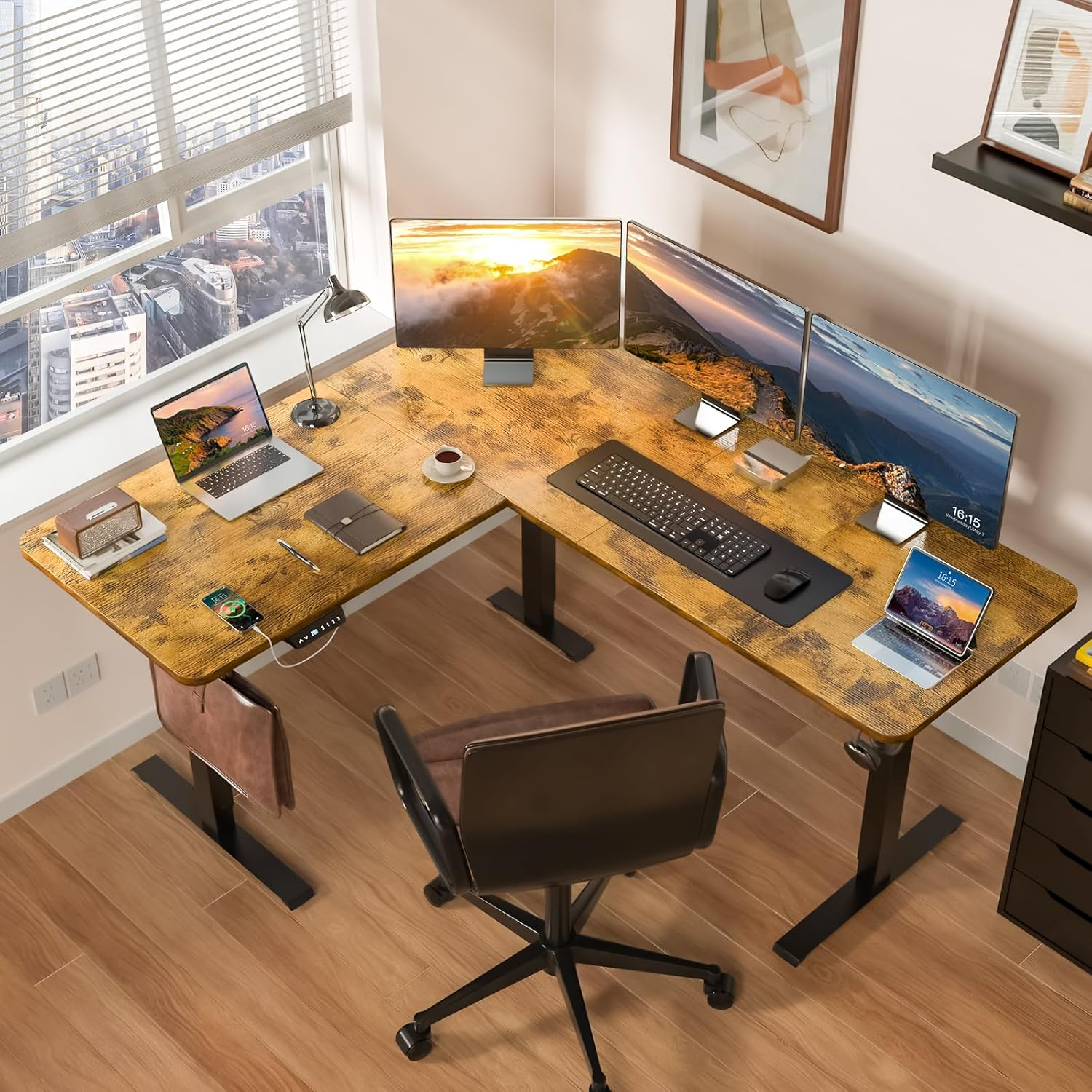
Understanding Different Computer Table Types and Their Functional Benefits
Common types of computer tables for home office setups
Home offices demand versatile computer table designs that balance workspace efficiency with spatial constraints. Four primary configurations dominate modern setups:
| Table Type | Key Feature | Best For |
|---|---|---|
| Standard Rectangular | Ample surface area | Multi-monitor setups |
| L-Shaped | Corner optimization | Multitasking workflows |
| Adjustable Standing | Ergonomic flexibility | Health-conscious users |
| Folding/Collapsible | Space-efficient storage | Temporary or compact environments |
Modern folding models now rival permanent desks in stability, with reinforced joints supporting monitors and peripherals. Corner desks enable distinct zones for computing, writing, and storage used in 35% of home offices according to 2023 workspace surveys.
Functional differences between computer table designs
Standing desks reduce sedentary strain through programmable height adjustments, while L-shaped configurations provide 30% more accessible workspace than linear counterparts. Collapsible tables excel in dual-purpose spaces, transforming from workspace to storage in seconds a feature 58% of apartment-based remote workers prioritize.
Built-in cable management systems (present in 72% of premium desks) minimize clutter more effectively than retrofitted solutions, especially important for multi-device setups.
Matching your computer table to daily work activities
- Content creators: L-shaped desks enable simultaneous drafting and digital editing
- Coding professionals: Standing desks with programmable presets reduce fatigue during marathon sessions
- Hybrid workers: Portable folding desks replicate office ergonomics in temporary spaces
- Administrative roles: Standard desks with integrated drawers optimize document management
Users spending 6+ hours daily at their workstation report 41% fewer musculoskeletal issues when using ergonomic desks (Journal of Occupational Health 2023). For equipment-heavy setups, modular designs allow customization as needs evolve.
Ergonomics and Health: Choosing a Computer Table for Long-Term Comfort
The Role of Ergonomics in Computer Table Setup and User Comfort
How we set up our home office spaces really affects how productive we can be and what kind of toll it takes on our bodies. When someone sits at a good quality computer table, their elbows naturally fall into about that right angle position, screens sit where they should for the eyes, and those long hours typing don't leave wrists aching so badly. Some recent research from last year showed interesting results too - people who had proper ergonomic setups complained about backaches and tired muscles way less often than folks stuck with regular old desks after working six whole months straight. The same rules work just as well for small writing tables as they do for bigger L-shaped workstations that take up half the room.
Adjustable Height Computer Tables and Long-Term Health Benefits
Adjustable height computer tables let workers easily move between sitting and standing positions throughout the day, which helps fight off the problems caused by sitting too long. Sitting all day can lead to heart issues and bad posture over time. According to some recent office research, people who use these adjustable desks report about 32 percent less pain in their necks and shoulders compared to folks stuck at regular desks. When shopping around, pay attention to desks that have smooth movement when adjusting heights and come with preset settings for different tasks. These features make switching positions much easier during busy workdays.
Optimal Desk Height and Posture Alignment for Home Offices
Finding the right desk height really comes down to what kind of chair someone uses and their individual body dimensions. When sitting at a desk most of the time, people generally want something around 28 to 30 inches high so their legs can rest comfortably with thighs roughly parallel to the ground. Those who alternate between sitting and standing might find that placing the keyboard area just a bit lower than where the elbows naturally hang works best, somewhere in the 42 to 48 inch range typically. Comfort over long periods means matching the desk with a good quality chair too. Look for ones that provide proper back support and allow adjustment of how deep the seat goes since these small details make all the difference when spending hours at workstations.
Standing vs. Sitting: Evaluating Desk Styles for Productivity and Well-Being
Switching from sitting to standing roughly every half hour or so helps blood flow better and keeps the mind sharper during work hours. Standing does burn around 15 percent extra calories per hour according to some research from Mayo Clinic back in 2023, but staying upright too long can really tax the legs. The best solution seems to be those hybrid desks that let workers move between positions easily throughout the day. These kinds of adjustable workstations handle both the benefits and drawbacks pretty well, especially when someone needs to stay productive for full eight hour shifts. For folks who want to minimize discomfort whether they're seated or on their feet, getting good quality anti fatigue mats makes all the difference. Also worth considering are monitor arms that keep screens at eye level regardless of posture, which takes pressure off necks and shoulders over time.
Space-Smart Solutions: Compact and L-Shaped Computer Tables for Home Offices
Maximizing Small Spaces with Minimalist and Compact Computer Tables
Computer tables designed for small spaces come packed with smart features that maximize every inch available. These days, top brands are making models as narrow as 50 inches wide complete with built-in wall mounts and stackable storage shelves. According to research from the Ergonomic Workspace Institute last year, this compact design cuts down on floor space needed by about a third compared to regular desks. The slim legs measure around 4 inches deep at most, and when placed against corners they free up valuable space in tiny bedrooms or city studio apartments. Despite their small size, these tables can hold two monitors thanks to sturdy construction rated for weights between 55 to 60 pounds.
Ideal Room Dimensions and Layout Considerations for L-Shaped Computer Tables
For proper setup, L-shaped computer desks need at least a 5 foot by 5 foot corner space. The longer arms typically measure around 72 inches and can handle workstations with three monitors. According to some recent studies from the Space Optimization Council published last year, these corner desk designs actually give users about 58% more working surface compared to regular rectangular desks when installed in smaller spaces under 120 square feet. When planning layout, it's important to leave between 28 and 32 inches of open space between the desk arms and other furniture items to make sure there's enough room for wheelchairs to maneuver comfortably around the workspace.
Cable Management and Workspace Efficiency on Larger Desks
Built-in solutions address the #1 productivity disruptor in home offices cable clutter. Top-rated L-shaped computer tables feature:
| Feature | Benefit |
|---|---|
| Grommet panels (4 6 ports) | Centralized device connections |
| Under-desk wire channels | Hidden power strip routing |
| Clip-on surge protector mounts | Reduced tripping hazards |
Modular designs allow reconfiguration of cable pathways as technology needs evolve.
Case Study: Remote Worker Transitions to an L-Shaped Computer Table
One software dev saw their daily productivity jump around 22% when they swapped out their old 48 inch straight desk for a bigger 60 inch L shape setup. The new arrangement kept all the coding stuff on one side while phones and chat apps sat comfortably within reach on the other end, cutting down those annoying pauses between tasks. Plus, with monitors mounted above and the computer tucked underneath, they actually gained back about 11 square feet in their cramped 10 by 12 foot home office space. Makes sense really, since we spend so much time at our desks these days.
Balancing Aesthetic Appeal and Practicality in Computer Table Design
Function vs. Style: What Matters Most in a Computer Table?
Modern computer table design requires balancing ergonomic functionality with visual harmony. While 63% of remote workers prioritize workspace efficiency over aesthetics in the 2024 Workplace Design Report, overly utilitarian designs can reduce user satisfaction by up to 41%. The ideal solution features:
- Adjustable cable management systems hidden within sleek profiles
- Task-specific work surfaces paired with minimalist support frames
- Integrated storage that maintains clean sight lines
Material Choices and Their Impact on Durability and Visual Appeal
What materials we choose really impacts how long things last and how everything looks together. Take engineered wood for example it brings that warm feeling at a good price point, though it doesn't hold up well over time. Tests from various labs show it wears down about twice as fast as those powder coated steel frames. Then there's glass which makes small rooms feel brighter during the day, no doubt about that. But let's face it, keeping glass clean takes way more work than those textured laminate surfaces people often overlook. Speaking of alternatives, bamboo has become pretty popular lately. It sits somewhere between traditional options like oak when it comes to strength, yet weighs around forty percent less. Makes sense why so many designers are turning to it these days.
Trend Analysis: Top Computer Table Features and Designs in 2024
2024's computer table innovations focus on adaptive workspaces:
-
Modular attachment systems (56% adoption in new designs)
Allow monitor arms and accessory trays to reconfigure without permanent fixtures -
Biophilic edges
Organic-shaped desk perimeters that reduce visual rigidity -
Integrated wireless charging
88% of premium models now embed power surfaces in desk pads
Hybrid designs combining standing desk mechanics with residential styling account for 34% of Q1 2024 sales, reflecting growing demand for health-conscious yet visually cohesive home offices.
Step-by-Step Guide to Choosing the Right Computer Table for Your Home
How to select the ideal computer table size based on your space and needs
Begin by measuring your available floor area and identifying traffic flow patterns. The 2023 Ergonomic Workstation Dimensions Study recommends a minimum depth of 24" (61 cm) for single-monitor setups and 30" (76 cm) for dual-screen configurations. For limited spaces, consider wall-mounted folding designs that preserve 36" (91 cm) of clearance for chair movement.
| Work Activity | Minimum Table Length | Critical Features |
|---|---|---|
| Writing/Note-taking | 40" (102 cm) | Pull-out keyboard tray |
| Graphic Design | 60" (152 cm) | Adjustable tilt surface |
| Video Conferencing | 48" (122 cm) | Built-in cable ports |
Evaluating your workflow to match desk functionality
74% of remote workers in a 2024 workspace survey reported productivity improvements after aligning their computer table features with task requirements:
- Creative professionals: Prioritize curved edges for arm support during long design sessions
- Data analysts: Opt for L-shaped configurations to separate screens from reference materials
- Hybrid workers: Choose sit-stand models with 22"-48" height adjustability (OSHA-recommended range)
Key buying considerations: Budget, assembly, and long-term value
Most people should put around two thirds of their money into the actual work surface and main structural parts since those are what really affect how long the piece will last. Laminate options tend to be about forty percent cheaper than real wood counterparts, though they won't stick around nearly as long either. Some tests show laminates need replacing almost twice as often as solid wood surfaces over time. When shopping around, check out furniture that comes with easy snap-on assemblies and already drilled holes for legs. These kinds of features cut down on assembly headaches significantly, saving roughly three quarters of the time it would take to wrestle with bolts and nuts for everything.
Frequently Asked Questions
What is the best type of computer table for small spaces?
For small spaces, minimalist and compact computer tables with built-in wall mounts and stackable storage shelves are recommended. These models are designed to maximize every inch of available space.
Are adjustable standing desks worth it for health benefits?
Yes, adjustable standing desks are beneficial for health as they allow users to switch between sitting and standing positions, reducing the risk of heart issues and improving posture over time.
How do I manage cable clutter effectively with larger desks?
Larger desks often come with built-in cable management solutions like grommet panels and under-desk wire channels to centralize device connections and reduce clutter.
What desk height is optimal for sitting workstations?
An optimal desk height for sitting workstations is generally around 28 to 30 inches, allowing for comfortable leg positioning with thighs roughly parallel to the ground.
Table of Contents
- Understanding Different Computer Table Types and Their Functional Benefits
- Ergonomics and Health: Choosing a Computer Table for Long-Term Comfort
- Space-Smart Solutions: Compact and L-Shaped Computer Tables for Home Offices
- Balancing Aesthetic Appeal and Practicality in Computer Table Design
- Step-by-Step Guide to Choosing the Right Computer Table for Your Home
- Frequently Asked Questions