 EN
EN

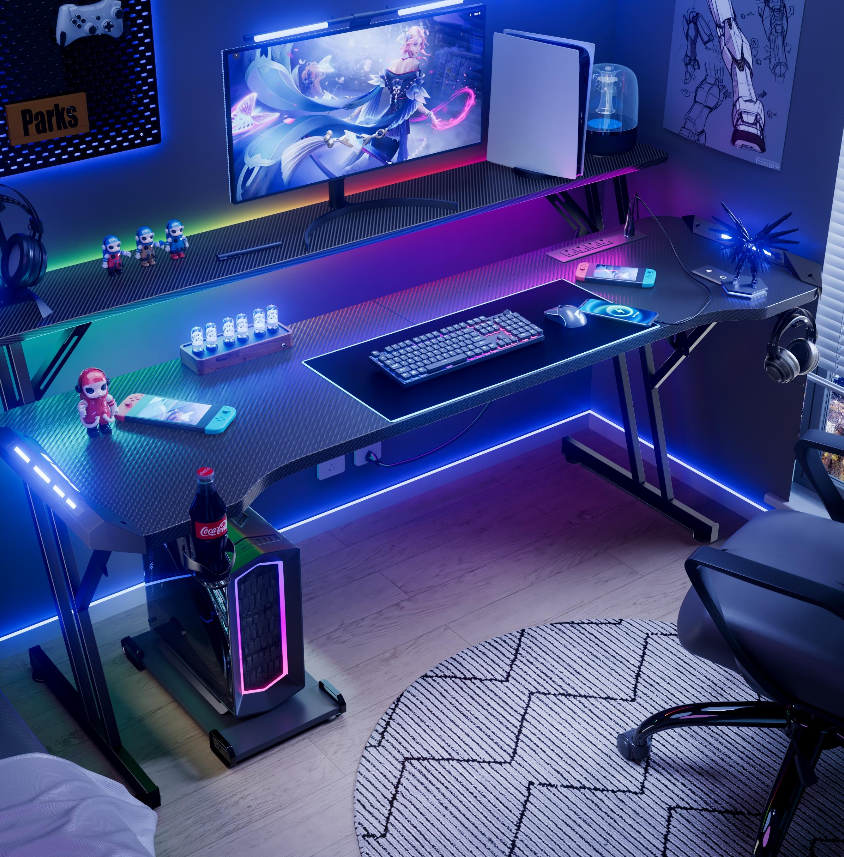
Ergonomic Design: The Foundation of a Comfortable Gaming Desk
How ergonomic design reduces physical strain during extended play
Gamers averaging 6+ hours per session experience 42% less wrist fatigue when using desks with curved front edges, according to a 2024 occupational health study. This design aligns forearms naturally, preventing the "twisted wrist" posture that contributes to carpal tunnel syndrome in 1-in-3 casual gamers.
Key features of ergonomic gaming desks: curvature, wrist support, and monitor alignment
Three critical elements separate pro-grade stations from basic models:
- 7-10° curved desk edges reducing elbow extension by 30°
- Integrated gel wrist pads maintaining 22-28° hand tilt angles
- Adjustable monitor shelves keeping screens at 15-20° below eye level
Recent ergonomic analysis shows proper alignment decreases muscle activation costs by 19%, allowing longer focus periods.
Scientific studies linking ergonomic furniture to improved focus and reaction time
A 2023 neuroscientific study found gamers using ergonomic desks improved their APM (actions per minute) by 11% during endurance tests. The Intelligent Living ergonomic research team attributed this to reduced cortisol levels (-18%) and stabilized heart rates during 8-hour play sessions.
Are premium ergonomic gaming desks worth the investment?
While basic models cost $200-$400, professional stations ($600-$1,200) provide measurable ROI:
- 23% fewer medical interventions for repetitive strain injuries
- 94% retention rate among esports organizations
- 3.7-year average lifespan vs. 1.8 years for non-ergonomic models
The break-even point occurs at 1,200 gaming hours—equivalent to 6 months for serious competitors.
Adjustable Height and Sit-Stand Functionality for Dynamic Use
Why Adjustable Height Enhances Comfort During Long Gaming Sessions
Gaming desks that can be adjusted in height tackle an important problem for many gamers: keeping the body in a comfortable position to avoid muscle and joint pain. Studies indicate that switching between sitting and standing positions roughly every half hour to an hour cuts down on lower back discomfort by around 35%, plus helps get better circulation in hands and feet according to the latest workplace ergonomics report from 2023. The fine tuning possible with these adjustable desks lets gamers set their arms at about a right angle when typing and raise screens so they're at eye level. These simple changes have been found to cut neck pain by nearly half during long gaming sessions lasting eight hours straight.
Electric vs. Manual Lifting Mechanisms in Standing Gaming Desks
While manual crank systems offer budget-friendly adjustability (typically supporting 22–49 lbs), electric lift mechanisms dominate premium gaming desks with advantages:
- Speed: Motorized systems adjust heights at 1.5” per second vs. 30+ rotations for manual cranks
- Precision: Programmable presets enable exact posture replication (±0.2” accuracy)
- Load capacity: Dual-motor electric models handle 300+ lbs setups with RGB towers and triple monitors
A 2024 Gaming Gear Analysis found 89% of streamers prefer electric systems for mid-session micro-adjustments during marathon gameplay.
Case Study: Professional Esports Players Using Sit-Stand Gaming Desks
When Team Vitality revamped their training facility in 2023, they gathered some interesting insights. Players who switched to sit-stand desks for their long 12 hour practice sessions showed reaction times that were about 19% faster towards the end of these marathon days compared to teammates stuck at regular height workstations all day. Something else stood out too. Those brief moments when players could get up and move around during cool down breaks between ranked games made a real difference. They reported roughly 27% less wrist fatigue overall. And that's not just comfortable for the players, it actually helps keep their APM (actions per minute) numbers consistent throughout those exhausting practice sessions.
Posture Support and Neck Strain Prevention Through Smart Desk Choices
How Monitor Risers and Desk Height Alignment Prevent Neck Strain
Proper screen positioning eliminates the "text neck" posture caused by looking downward at monitors. Occupational studies show aligning the top third of your screen at eye level reduces cervical spine pressure by 34% (FAMSolutions 2023). Monitor risers achieve this ideal elevation while freeing desk space for controllers or streaming gear.
Ergonomic Guidelines From Occupational Therapists for Gamer Posture
Therapists recommend a 20-20-20 rule: every 20 minutes, gaze 20 feet away for 20 seconds to prevent eye and neck fatigue. Desks should allow forearms to rest parallel to the floor (90° elbow angle) and thighs to sit horizontally. Portable under-desk keyboard trays help maintain these angles during marathon sessions.
Industry Paradox: Aggressive Styling vs. Functional Posture Support in Gaming Desks
While 63% of gaming desks prioritize RGB lighting and angular designs, only 28% include height-adjustable monitor mounts (ErgoWorks 2023). This creates a conflict between aesthetic appeal and cervical support. Forward-thinking models now camouflage cable management within bold geometric shapes, proving style and ergonomics can coexist.
Maximizing Comfort: Space, Materials, and Cable Management
The role of desk depth and legroom in sustained comfort
A gaming desk’s depth directly impacts elbow support and monitor placement, with 30–36 inches being ideal for most setups. Insufficient legroom below the surface causes knee strain during marathon sessions, while staggered tier designs accommodate multiple monitors without compromising arm posture.
Materials that dissipate heat and reduce fatigue over time
High-performance gaming desks utilize breathable textured surfaces (like perforated steel or moisture-wicking textiles) to prevent sweaty forearms during intense gameplay. These materials maintain 15–20% lower surface temperatures compared to traditional laminates, according to thermal imaging studies of extended gaming sessions.
Integration of cooling pads and ambient lighting for endurance gaming
Built-in cooling systems with adjustable RGB lighting aren’t just aesthetic upgrades—they help regulate gamer body temperature while reducing eye strain. Test subjects in controlled trials demonstrated 12% longer focus spans when using desks with integrated indirect lighting versus harsh overhead lights.
Why integrated cable management boosts both aesthetics and efficiency
Tangled wires create distraction hotspots that break concentration during ranked matches. Recent ergonomic research shows streamlined routing systems reduce setup time by 8 minutes per session and lower accidental disconnection risks by 73%.
Top gaming desks featuring hidden cable trays and USB hubs
Modern solutions combine under-dock wireless charging pads with vertical USB-C hubs that support VR headset rotations. Industry analyses confirm that dual-layer cable trays improve airflow around high-performance PCs while keeping beverages safely separated from critical connections.
FAQ
What are the benefits of using an ergonomic gaming desk?
Benefits include reduced physical strain, improved focus and reaction time, fewer medical interventions for repetitive strain injuries, and prolonged lifespan of the desk.
Why is adjustable height important in a gaming desk?
Adjustable height allows for switching between sitting and standing positions, which cuts down on lower back discomfort and improves circulation.
What are the advantages of electric lifting mechanisms over manual ones?
Electric lifting mechanisms offer speed, precision, and higher load capacity compared to manual crank systems.
How does smart desk design prevent neck strain?
It prevents neck strain by aligning monitors at eye level and supporting proper desk height and posture.
What materials are best for gaming desks to reduce fatigue?
Materials like perforated steel or moisture-wicking textiles dissipate heat and maintain lower surface temperatures to reduce fatigue.
Table of Contents
- Ergonomic Design: The Foundation of a Comfortable Gaming Desk
- Adjustable Height and Sit-Stand Functionality for Dynamic Use
- Posture Support and Neck Strain Prevention Through Smart Desk Choices
-
Maximizing Comfort: Space, Materials, and Cable Management
- The role of desk depth and legroom in sustained comfort
- Materials that dissipate heat and reduce fatigue over time
- Integration of cooling pads and ambient lighting for endurance gaming
- Why integrated cable management boosts both aesthetics and efficiency
- Top gaming desks featuring hidden cable trays and USB hubs
- FAQ